
Facebook page managers, take advantage of Facebook’s notification feature for a no-cost tactic to get more Likes!
On your desktop, log into your Facebook page as an administrator and click on the Notifications tab at the top. Among the list of notifications will be some that say “so and so like your link. Help them see future posts by inviting them to Like your page.” See screenshot below
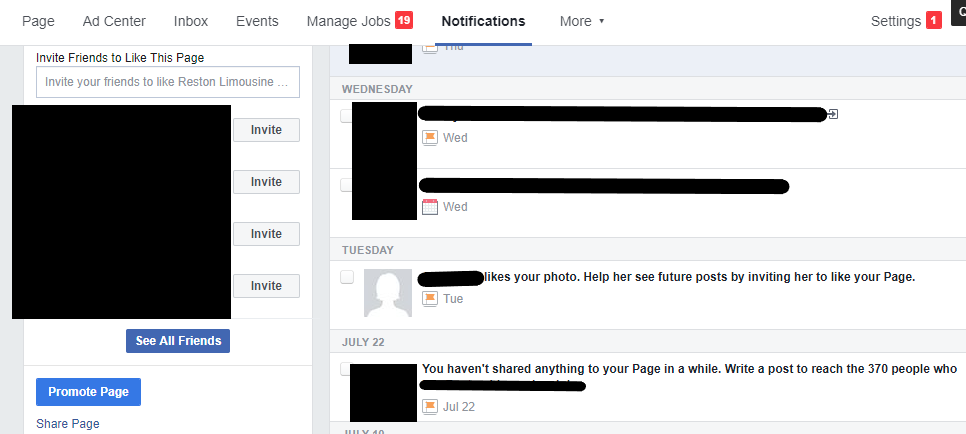
You’ll note that there is another way to ask for Likes – in the screenshot above, there’s a box to the left where you can click on the buttons to Invite your Friends to the page. I avoid this tactic unless I know the page is relevant to the friends I’m inviting. In this case, the people being invited have already interacted positively with a post or photo or video – it’s not a huge stretch to invite them to Like the page.
Back to the Notifications list. You’ll click on the invite notification and get a small popup window showing you the post.
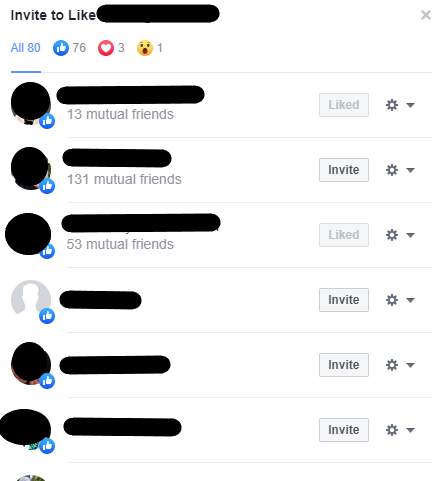
Here’s where it gets tricky – sometimes you’ll automatically get a popup window showing you the list of people who liked the post. Beside their name there will be an Invite button if they haven’ted already Liked your page. See screenshot below:
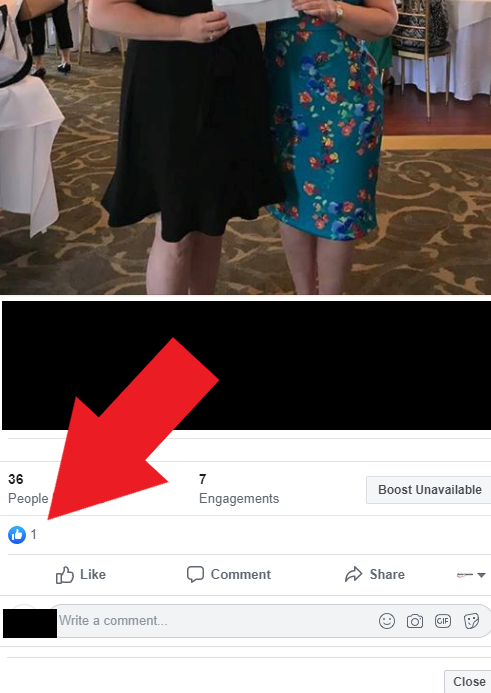
BUT sometimes that window won’t automatically pop up. In which case you have to take another step: when the post pops up, click on the blue circle Like icon right below the engagement stats. See screenshot below
Word of caution: If you are just starting to do this and have dozens of Invite buttons, start from the bottom notification and work your way up – don’t rush and go crazy clicking on the Invite buttons to get it all done in one sitting. If you do, Facebook may penalize you by suspending your ability to Invite people for a period of time. The penalty doesn’t apply to other pages you manage, just the one you are working on.
Note: I haven’t seen this feature on mobile – if you have, please leave a comment below with details – mahalo!
 tphowemarketing.com